Best Practices for Passpoint and Mobile Offloading
01 Introduction
This guide provides a brief overview of primary recommendations and best practices for configuring your network for Passpoint (Hotspot 2.0) and carrier offload. Please view this guide as considerations and guardrails as opposed to hard requirements.
Note
These are general recommendations; you are ultimately responsible for your own network configuration, performance, capacity, and security.
02 Wi-Fi Hardware Requirements
Your Wi-Fi equipment, firmware, and controller must support:
- Passpoint (Hotspot 2.0)
- WPA2-Enterprise (802.1X) with RADIUS (WPA3 recommended)
- RadSec (RADIUS over TLS)
No Native RadSec Support?
If your equipment does not natively support RadSec, we can provide a configuration for a radsecproxy Docker container to run on an Intel-based, always-on local host server or device with a static IP address accessible by your wireless APs and WLAN Controller on RADIUS ports 1812 and 1813. RadSec port 2083 must be allowed outbound to the internet. If such a device is unavailable, we can assist in building a low-power mini PC for this purpose.
Certain vendors (e.g. Meraki, Mist) may have some native support for RadSec, but require mutual certificate management. If this is the case, and you cannot host a server locally or via VPN tunnels, please inquire about alternate RadSec solutions.
03 Minimum Network Requirements
Bandwidth Requirements
In many cases, Passpoint Wi-Fi will use less than 10% of your available bandwidth. However, to ensure seamless operations, your network should meet the following minimum requirements:
| Requirement | Minimum |
|---|---|
| Download Speed | 25 Mbps |
| Upload Speed | 10 Mbps |
| Latency | <100ms |
| Jitter | <50ms |
| Packet Loss | <5% |
| Wi-Fi Rate Limiting | >5 Mbps per client device |
VLAN Requirements
You will need a dedicated VLAN for Passpoint Wi-Fi. This can be the same VLAN as your existing Guest Wi-Fi, but we strongly recommend a dedicated VLAN for security, capacity, and monitoring. You will need a much larger DHCP pool than a normal Guest Wi-Fi network, more on this below.
ISP Requirements
Carriers expect and demand Voice-Grade networking to allow carrier offload onto Wi-Fi. Voice-grade networks require low latency (<150ms), minimal jitter (<20-30ms), and near-zero packet loss (<1%) to ensure high-quality audio. Bandwidth needs are low, generally requiring as little as 128 Kbps (upload/download) per concurrent call, with robust Wi-Fi signal strength at -65 dBm or better for voice over Wi-Fi. The "industry standard" commonly documented as "under 150 ms latency one-way" is a somewhat legacy expectation. Nowadays, 50 ms or better being more of a modern standard for reliable and acceptable quality voice, with jitter less than 5-10ms.
While LTE or Satellite ISPs can be successful for Passpoint deployments, a low latency wired connection is highly recommended. LEO Satellite (Starlink) can be successful; high-latency Satellite (ie HughesNet) will not be successful. High-latency connections are not voice-grade, and traffic may be rejected by the carriers. Double NAT is not recommended, as voice-grade networking requires IPSec encapsulation remain intact from end to end. Double NAT can break that encapsulation and UDP services over Wi-Fi (Wi-Fi Calling) will be degraded or disconnected.
04 LongFi Passpoint Network Architecture
Wi-Fi Certified Passpoint®
Passpoint® streamlines Wi-Fi access, eliminating the need for users to find and authenticate to a network each time they visit. Passpoint automates the entire process of network authentication, enabling more seamless Wi-Fi connectivity between Wi-Fi networks, cellular networks, and mobile devices.
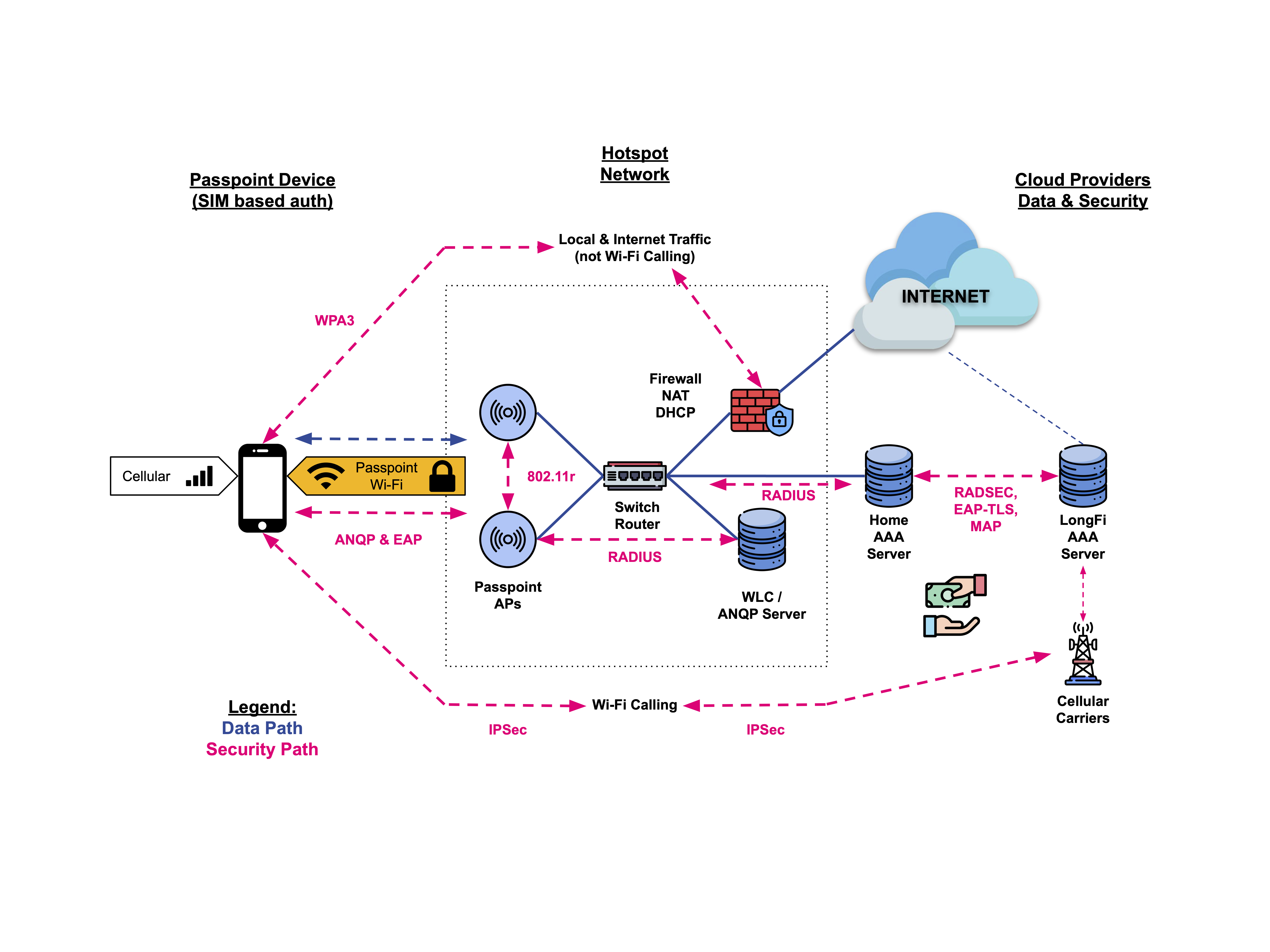 { .img-md}
Our Passpoint-based solutions offer the following features to enhance the mobile experience:
- Automatic network discovery and selection
- Seamless network access and roaming between hotspots
- Enhanced WPA3™ security
- Monetized cellular network convergence with Wi-Fi
05 Wired Network Design & Configuration
Network Configuration, Segmentation & Security
Passpoint offers much better security than normal open or captive portal guest Wi-Fi. While voice and text are secured by IPSec tunnels directly from the device to the carrier network, all other traffic terminates on the VLAN assigned to the Passpoint SSID. The security requirements for your Passpoint/Guest Wi-Fi and Passpoint/Guest VLAN will be unique to your organization, and traffic on your wireless and wired network should be secured and monitored based on those requirements.
- Create a Guest/Passpoint VLAN isolated from internal VLANs using firewall rules and ACLs
- You can use an existing Guest Wi-Fi VLAN, subnet, and DHCP scope if available
- A new, separate Guest/Passpoint VLAN may be useful for setting different rate limits, DHCP settings, or monitoring traffic, security, and policies
- You may want to keep your normal Guest Wi-Fi and Guest VLAN for non-cellular devices such as tablets and laptops — Passpoint is for mobile devices with a SIM and mobile plan
- The Passpoint VLAN should have a large DHCP scope with a short lease time (e.g., 60 minutes) to accommodate transient users. We typically use a /16 subnet, where Wi-Fi client isolation settings protect that subnet from excessive overhead. Monitor traffic and clients over time and adjust as needed.
- Use a Next-Gen Firewall with regularly updated threat signatures, IDS/IPS, and optional content filtering. No open inbound ports are required. RadSec port 2083 must be allowed outbound.
- While Passpoint greatly improves Wi-Fi security through encrypted WPA2/WPA3 and EAP-TLS, you may want to actively monitor this network segment for potential threats
- Enforcing content filtering may help maintain the reputation of your public IP and ISP account. You may want to use a different public IP for Passpoint traffic if you have critical security requirements.
- If DNS filtering or sinkhole is part of your security and content filtering strategy, the Passpoint VLAN clients will need to receive the DNS server address of your content filtering server (most likely your firewall/router) via DHCP
Legal Notes
Carrier Offload via Passpoint Wi-Fi has very strong legal protection for you, the Access Network Provider and Passpoint Operator. Please inquire for the full legal framework and indemnification clauses.
Bandwidth Management
- Adding users may affect your network. Planning for capacity is an important consideration if you have business-critical users, devices, and traffic.
- You may want to apply a bandwidth cap to the Guest VLAN to protect core business operations
- Example: On a 100 Mbps connection, reserve 70 Mbps for internal use and 30 Mbps for Passpoint users
- As your Passpoint usage grows, you can adjust this limit based on observed traffic and performance. There is no minimum commitment to start, and the Passpoint Wi-Fi may be easily disabled at any time.
- To support more traffic and increase revenue while preserving bandwidth for business-critical traffic, consider upgrading your ISP account or adding a lower-cost residential-class ISP account and modem connected to a new WAN interface on your firewall
06 Wireless Network Configuration & Optimization
Passpoint Wi-Fi SSID Setup
- Configure the new Passpoint SSID using the provided instructions, and set the Access VLAN to your new Passpoint/Guest Wi-Fi VLAN, or the existing Guest Wi-Fi VLAN
- The Passpoint SSID should enforce client isolation and guest policies that allow clients to reach the internet, but deny communication to any other users, devices, or subnets
- Do not configure captive portals, grace periods, or pre-authentication walled gardens — devices need low-latency access to DNS and RADIUS/RadSec
- Passpoint devices should be able to quickly access:
- The Default Gateway
- DHCP & DNS servers
- The Public Internet (via responsive DNS)
Wireless Security
- WPA3 is recommended for wireless security and encryption, future-proofing your network for the next 5–7 years
- WPA3 is backward-compatible with WPA2 when using 802.1X and EAP-TLS
- If WPA3 isn't fully supported by your wireless equipment, WPA2 with the same authentication protocols may be used with legacy hardware that supports Passpoint (Hotspot 2.0)
- WPA3 and PMF (Protected Management Frames) are required for 6 GHz Wi-Fi
- AFC (Automated Frequency Coordination) is required for outdoor 6 GHz usage
- If you upgrade to WPA3 and 6 GHz-capable gear later, you will need to adjust your SSID settings accordingly
Capacity Planning
- Limit the number of clients per AP:
- Mixed-use APs (indoor, business & Passpoint devices): 30–50 clients
- Passpoint-only APs (outdoor, facing a high traffic area): 70–80 clients
- Apply rate limits:
- Per SSID (shared bandwidth)
- Per client (5–10 Mbps per device is a common starting point)
- Excessive rate limiting can cause wireless congestion and reduce airtime
- Other capacity considerations:
- Because devices automatically find and join Passpoint Wi-Fi, you will have many more "transient users" than normal. A transient user may not even move data across your network, but will still consume an IP address and a syslog.
- If your vendor only supports a certain number of logs, it is possible to fill up logs in a few days, where previously you showed logs back several weeks or months. Consider external logging if this is a concern.
- Some vendors may not support client limits on an AP or SSID. Consider how this may affect your traffic. For example, if you have critical Point of Sale devices near the front door of your business, and the front door is by a very busy train station, you may have many more devices join than the RF channel and AP radio can reasonably support. Consider another AP on another channel for such locations, or a Software Defined Radio (e.g. dual-5 GHz capabilities).
Coverage, Airtime Optimization & Geofencing
Minimum RSSI (client signal strength) threshold — set to avoid poor connections:
- Start at -80 dBm
- Lower to -85 dBm if few devices connect
- Raise to -75 dBm if traffic is too high
- A higher Minimum RSSI (-75 dBm) is advisable for indoor coverage areas
- A lower Minimum RSSI (-85 dBm) may be appropriate for outdoor coverage areas
- Helps preserve airtime for devices with strong signals and reduce transient clients (e.g. a phone in a passing car)
Minimum Basic Rates (MBR) & Beacon Rates:
- Consider raising the MBR to 6 or 12 Mbps to prevent distant or weak connections
- Preserves performance for nearby devices and improves roaming behavior
- Has a similar impact as Minimum RSSI, but requires more care and understanding of legacy client devices
Warning
When in doubt, consult your equipment vendor or LongFi Engineers before modifying these settings.
Geofencing:
- Both Minimum RSSI and MBR can be considered forms of geofencing
- You may want to restrict Passpoint access to specific areas
- Example: More aggressive geofencing can limit access to devices inside a building, but not nearby public spaces like parking lots
Roaming & Wi-Fi Calling Enhancements
- Enable 802.11r Secure Fast Roaming
- Enable 802.11k Neighbor List Reporting (optional — may affect legacy clients)
- Enable 802.11v BSS Transition Management (optional — may affect legacy clients)
Other Wi-Fi Enhancements
Note
These settings are recommended for operators who are familiar with Wi-Fi protocols and standards, and understand how these settings may negatively affect certain networks and devices.
We notice lower airtime usage, better performance, lower latency, and faster connections with the following settings on your Passpoint Wi-Fi SSID:
- Multicast and Broadcast Blockers enabled (disallow mDNS, SSDP, etc.)
- 2.4 GHz disabled in all but the highest density environments (Theater, Arena, Large Public Venues may benefit from enabling all bands)
- Band Steering disabled in all but the highest density environments (Theater, Arena, Large Public Venues may benefit from Band Steering)
- Proxy ARP enabled
- UAPSD enabled (or other power saving settings for mobile devices)
- Do not override QoS settings (allow QoS, allow/trust DSCP on wireless and wired network segments)
- Ignore Probe Requests (in high density environments)
Have questions? LongFi Solutions Engineers are here to help!